
Many Nigerian entrepreneurs do not just run one shop. You might own a pharmacy in the morning, a boutique in the afternoon, and a logistics service on the side. Managing these as separate entities with different logins is a recipe for disaster. You end up juggling multiple apps, losing track of your total revenue, and wasting precious time.
SaleTick solves this by allowing you to manage multiple distinct businesses under one single account. You can switch between your ventures with a single tap, keeping your operations organized, professional, and profitable.
Why You Need a Unified Business Dashboard
When you run different businesses, keeping your data siloed is dangerous. You need a bird’s-eye view of your entire portfolio. By consolidating your businesses under one SaleTick account, you gain:
- Efficiency: No more logging in and out of different accounts.
- Total Visibility: See your total business performance across all ventures in one place.
- Simplified Management: Use the same powerful tools for inventory, sales, and staff across all your businesses.
- Professionalism: Keep your records clean and audit-ready for every single business you own.
Step-by-Step: Creating and Switching Between Businesses
This feature is accessible only to Administrator Accounts and with this feature SaleTick makes it incredibly easy to add a new business to your existing profile. Follow this process to expand your portfolio using the Admin Settings menu.
1. Access Admin Settings
Log in to your SaleTick dashboard. Open your hamburger menu on the top left and navigate to Settings. This is your central hub for all business-level configurations.

2. Create a New Business
In the Admin Settings, Scroll down and tap on Create New Business.

You will be prompted to add Profile Image and fill in the following details for your new venture:
- Business Name: Enter the name of your new business.
- Business Address: Provide the physical address of the location.
- State: Enter the state or province where the business is located.
Once you have entered all the information, tap the Create Business button to save your new venture to your account.

3. Switch Between Your Ventures
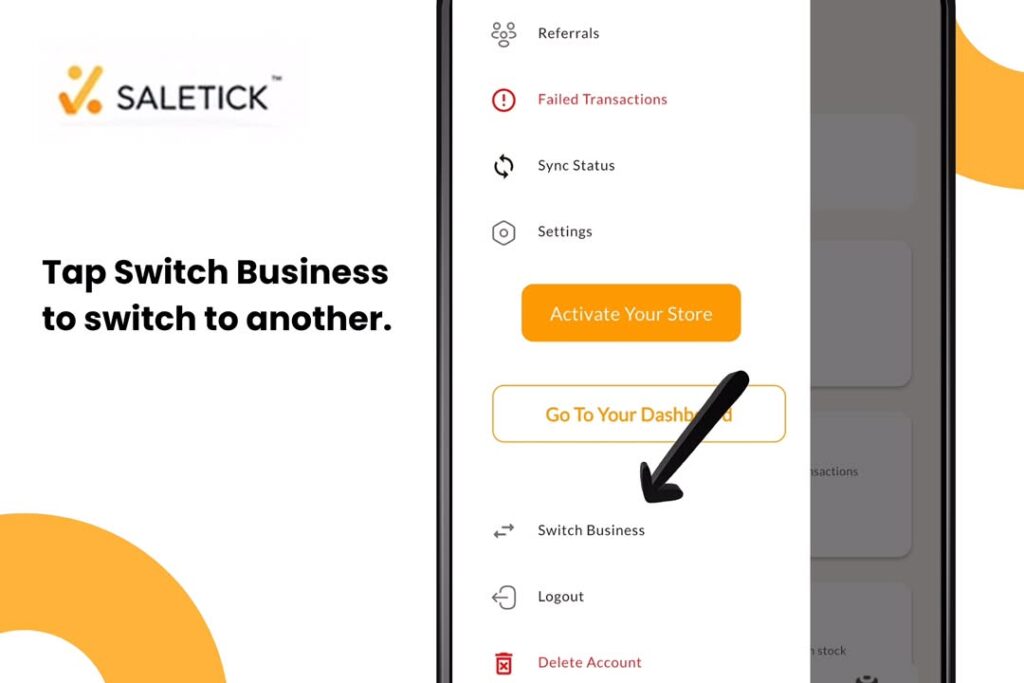
Once you have created your businesses, switching between them is instant. In the same section of your Admin Settings Page, tap Switch Business. Select the business you want to manage from the list. The entire dashboard will refresh to show the inventory, sales, and reports specific to that selected business.
Why SaleTick is the Best Choice for Nigerian SMEs
SaleTick is built for the reality of Nigerian business. We understand that you are busy and need tools that work as hard as you do. By centralizing your multiple businesses, you stop wasting time on administrative clutter and start focusing on what really matters: growing your profit.
Watch the Expert Guide
See exactly how to navigate these features in our latest video tutorial.
Watch YouTube Video: How to Manage Multiple Businesses on SaleTick
Take control of your business empire and do not let the complexity of running multiple ventures hold you back. With SaleTick, you have the power to monitor, manage, and scale every single one of your businesses from one place. Download the Saletick app from our website or Download the app from Google Play Store or Apple Store and Log in to your SaleTick dashboard now to add your next business so your business speaks today.